



 Close Menu
 World
World
 Biography
 Health
 Education
 Business
 Lifestyle
 Sports
 Technology
 Animals
 History
 Food
Food
 Religious
 Startups
 Movies
 Politics
 Fashion
 Covid
Covid
 Diet
Diet
 Fitness
 Marketing
 Travel
 Science
 Reviews
 Social media
 Stories
 Facts
Facts
 Art
Art
 Entertainment
Sharon Bennett

Business
Unlocking the Power of Data: Converting YAML to JSON Made Easy
 Sharon Bennett
In the modern digital landscape, data is king. Whether you’re a developer, a data analyst, or someone who just loves working with structured information, knowing how to manipulate data efficiently can save hours of time and eliminate frustration. Among the most commonly used formats today are YAML and JSON, each with its own unique strengths. While YAML is loved for its readability and simplicity, JSON is prized for its wide compatibility across programming languages. Understanding how to seamlessly move between these two formats is an invaluable skill.
Why Convert YAML to JSON?
The process of yaml to json conversion is more than a technical task—it’s about making data accessible and actionable. Many APIs and tools prefer JSON for its lightweight, machine-friendly structure. On the other hand, YAML is human-readable and often used in configuration files, documentation, and DevOps workflows. By converting YAML to JSON, you can take advantage of both worlds: create content that is easy for humans to write and read, and ensure that applications can efficiently process it.
One of the greatest benefits of this conversion is interoperability. Imagine working on a project where your configuration is written in YAML, but the application only supports JSON. Rather than rewriting everything manually, a simple conversion allows your workflow to stay intact. Additionally, tools like JavaScript frameworks, cloud service APIs, and even CI/CD pipelines frequently require JSON, making this skill essential for anyone in tech today.
How to Effectively Convert YAML to JSON
Converting YAML to JSON doesn’t have to be a daunting task. There are several methods you can use, ranging from online tools to command-line utilities and programming libraries. Here’s a friendly guide to help you understand the options:
- Online Converters: If you’re looking for a quick solution, online tools allow you to paste your YAML content and instantly generate JSON output. This is perfect for small tasks or testing data structures on the fly.
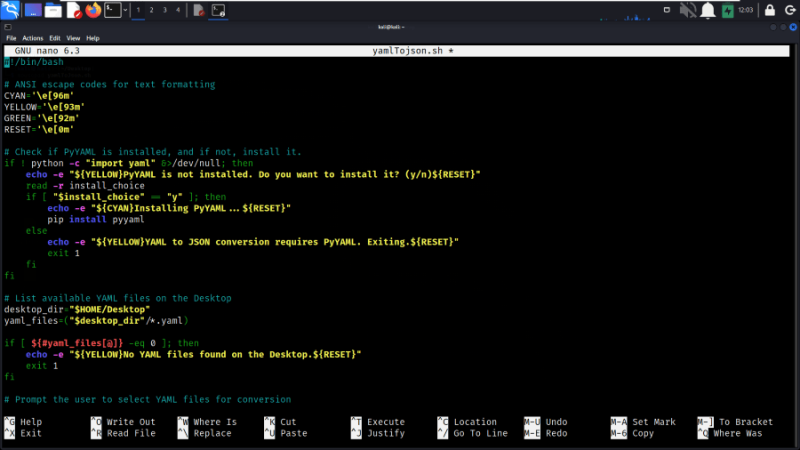
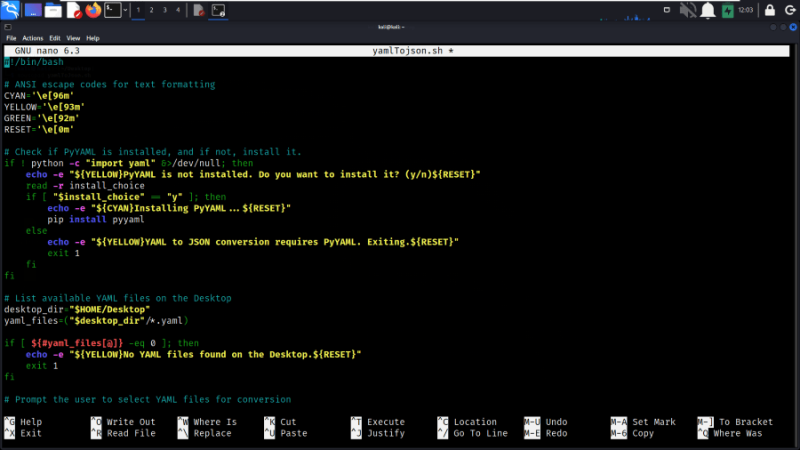
- Command-Line Tools: For developers working in Unix-like environments, tools like yq or pyyaml in Python make conversion effortless. For example, with Python, you can load YAML using the PyYAML library and then use json.dumps() to convert it into JSON. This method is perfect for automating processes in scripts.
- Programming Libraries: Many programming languages support libraries for both YAML and JSON. In JavaScript, you might use js-yaml to parse YAML, then JSON.stringify() to generate JSON. This approach integrates directly into applications, ensuring that data handling is smooth and programmatically consistent.
The key is understanding that the conversion is not just about changing formats—it’s about preserving the structure and meaning of the data. With proper tools, this process is fast, reliable, and surprisingly intuitive.
Real-World Applications
Understanding yaml to json conversion opens the door to a multitude of practical uses. In cloud computing, Kubernetes configuration files are often written in YAML but need to interact with services expecting JSON. In web development, APIs almost universally prefer JSON, so converting readable YAML configurations ensures compatibility. Even in data analytics, converting YAML datasets to JSON allows you to leverage modern visualization tools and libraries that rely on JSON inputs.
Additionally, this knowledge improves collaboration across teams. Developers, system administrators, and data engineers can all work with the same data while using the format most convenient for them. The ability to switch between formats seamlessly reduces errors and improves efficiency—a true win-win scenario.
Conclusion:
Learning to convert YAML to JSON is more than just a technical skill—it’s a way to enhance your workflow, improve productivity, and make data truly versatile. By understanding the strengths of both formats and knowing the tools and methods for conversion, you can ensure your data is always ready for the task at hand. Whether you’re managing cloud configurations, developing applications, or handling complex datasets, this ability makes your work smoother and more professional.
Source:
Click for the: Full Story
You might like








You Might Like this